
Versa Titan Release Notes for Releases 11.0 and 11.2
This document describes features, enhancements, bug fixes, limitations, and recommendations in Titan Releases 11.0 and 11.2.
The Versa Titan software supports Versa Operating SystemTM (VOSTM) Release 22.1.4 Ubuntu 18.04 (Bionic) version and Release 21.2.3 Ubuntu 14.04 (Trusty) and Bionic versions. Your VOS devices must be running the latest supported VOS software version. To check the VOS software version, go to the Inventory menu in the Titan Portal dashboard. To upgrade the software, see Upgrade the Software. For any VOS devices running Ubuntu 14.04 (Trusty), you must contact Versa Networks Customer Support to upgrade them to Ubuntu 18.04 (Bionic) version.
For more information about the VOS release and features, see Versa Operating System (VOS) Release Notes for Release 21.2 and Versa Operating System (VOS) Release Notes for Release 22.1.
January 14, 2026
Revision 2
Product Documentation
The Versa Networks Titan product documentation is located at https://docs.versa-networks.com/Titan.
New Features
This section describes the new Versa Titan Portal features introduced in Releases 11.0 and 11.2.
Titan Portal Release 11.2
Inventory
- Automatic SPack and OS SPack updates—Titan syncs SPack and OS SPack values automatically with Versa Director, which eliminates manual updates, maintains version alignment, and ensures smoother operational consistency. See Manage Device Inventory.
Networks
- Denial of Service (DoS) protection policy—The DoS protection policy feature offers aggregate and classified profiles with threshold control, alarm, and protection actions, such as SYN cookie. DoS protection policy enhances your security posture and streamlines policy management in the Titan UI. See Configure Security.

- IPsec tunnel initiation enhancement—The new WAN configuration option, Tunnel Initiate, allows administrators to choose between Automatic tunnel mode (initiates and responds) or Responder Only tunnel mode. You use this option to control VPN behavior in hub-and-spoke or managed site deployments. See Configure IPsec Backhaul.

- User management in VOS—A new user management capability under device and template settings enables the assignment of administrators to specific devices or mass publish across multiple devices. This ensures clear accountability, role segmentation, and faster provisioning of users in large networks. See Configure Miscellaneous Parameters.

- Scheduled software upgrade—You can now upgrade devices automatically through the scheduled upgrade feature. Administrators can select devices, choose a time, and schedule system-wide updates in 15-minute slots for controlled, predictable rollouts. See Manage Device Inventory.

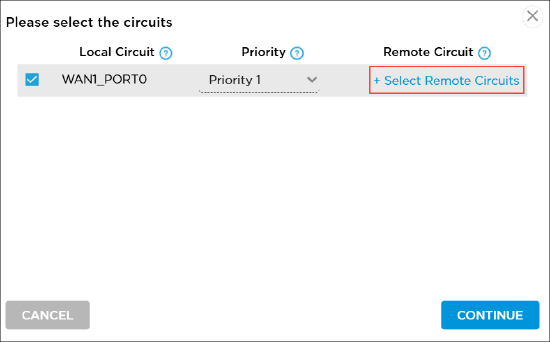
- Steering remote circuit—Adds precise control to WAN steering by mapping traffic from one port to another (for example, from WAN1 to remote WAN2). Using this feature improves traffic optimization and redundancy, and simplifies multi-port site designs. See Configure Traffic Steering.
Organization Settings
- Zone protection profiles—Extends DoS protection capabilities to both Org Settings and WAN configuration. Administrators can define flood, scan, and packet protection with adjustable thresholds and actions, ensuring consistent and layered defense across all networks. See Manage Organization Settings.

SASE
- VSIA, VSPA, and VSIPA behavior, Version 2—Refines SASE gateway tiering and feature allocation. Essential, professional, and secure app optimization tiers are now standardized. The professional tier includes full UTM and unrestricted app access, and the essential tier retains baseline coverage. Multitenant setups now support Versa endpoint client for remote access VPN (RAV) with full-tunnel connectivity, improving transparency in client and UTM availability. Existing organizations remain on Version 1, and new organizations default to Version 2.
Templates
- Device and service template enhancements—Improvements to templates include a retry button for failed actions, multiple template attachments per device, tier visibility during mass publish, enhanced configuration preview with highlighted changes, and template save control for deployment workflows. These enhancements simplify mass publish management and improve configuration clarity. See Manage Templates.
Titan Portal Release 11.0
Templates
- Support for DTLS and TLS-based VPN—You can use TLS/DTLS-based VPN (like SSL VPN) for remote user access across all networks, including hotel WiFi, home networks, and mobile hotspots without any special configurations. TLS/DTLS-based VPN uses port 443 which is almost never blocked by firewalls, so users can connect securely from anywhere. DTLS even improves performance for real-time apps such as video or voice. See Configure an Endpoint Client Service (Remote Access VPN) Template.

Network
- Domain name field in DHCP server—Domain name feature allows DHCP clients to automatically append a custom domain name to unqualified hostnames, enabling internal DNS resolution and a more user-friendly network experience. For example, if you configure the DHCP server to advertise the domain name branch1.company.local, a client receiving this configuration automatically resolves printer01 as printer01.branch1.company.local. See Configure LAN Connections.

- LAN multiple IP addresses—You can add multiple IP addresses and subnet masks to a single LAN or VLAN interface. Multiple IP addresses and subnet masks are available only with static IP configuration. See Configure LAN Connections.

- LTE band selection—You can select the LTE band to control which cellular frequency bands your device uses, which helps avoid poor quality connections and improves overall wireless stability. See Configure LTE Connections.
- Uplink and downlink bandwidth options for LAN/VLAN—Configure the uplink bandwidth and downlink bandwidth for LAN and VLAN interfaces to ensure that traffic shaping and QoS policies reflect actual internet service provider speed for more efficient and predictable network performance. You can enter the bandwidth limit values in Kbps, Mbps, or Gbps. Values entered in Kbps and Gbps are automatically converted to Mbps. See Configure LAN Connections.

- URL category cache for cloud lookup—URL category caching is a performance optimization that stores previously categorized URLs locally, speeding up policy enforcement and reducing cloud lookups. The default cache duration is 6 hours. This helps enhance performance by minimizing repeated cloud-based lookups for the same URLs.
Organization Settings
- Multi-region organizations—For store administrator, MSP, or reseller, you can select the available region(s) for custom applications, custom URL categories, and alerts and notifications. See Manage Organization Settings.

- Routing Instance field added to the Custom Logging Profile—With the Routing Instance field, you can define the exact path for log delivery, enabling greater flexibility, segmentation, and clarity in log transport. For example, if a customer network has both Tenant-A and Tenant-B routing instances, you can configure logs related to each tenant to exit through their respective VRFs, ensuring isolation, traceability, and policy control. See Manage Organization Settings.

- SNMP USM configuration—SNMP user-based security model (USM) provides a robust framework for secure, standards-based network monitoring, with user-defined authentication, encryption, and access control. You can configure an SNMPv3 user with the following:
- Authentication using SHA-256
- Privacy using AES-128

- Subject field added to Alerts and Notifications—The Subject field is introduced in the Alerts and Notifications configuration under Organization Settings, which allows you to customize the subject line of alert emails. See Manage Organization Settings.

Security
- Import bulk IP addresses in firewall and policy rules—This feature simplifies firewall and policy rule management by allowing fast, bulk IP address imports which is ideal for large networks and dynamic policy environments. Enter multiple IP addresses separated by commas. Note that this overwrites any existing IP addresses. See Configure Security.


- Negate option on firewall rules and SD-WAN rules—You can use the Negate option to match everything except specific IP addresses—enabling exclusion-based policy logic for greater precision and efficiency in firewall rules design. See Configure Security.

- Rule Copy option in firewall rules—Administrators can duplicate existing firewall rules with a single click using the Copy Rule action added to the firewall rules UI. This option streamlines policy creation by eliminating the need to manually recreate similar rules, saving time and ensuring configuration consistency across deployments. See Configure Security.

Miscellaneous
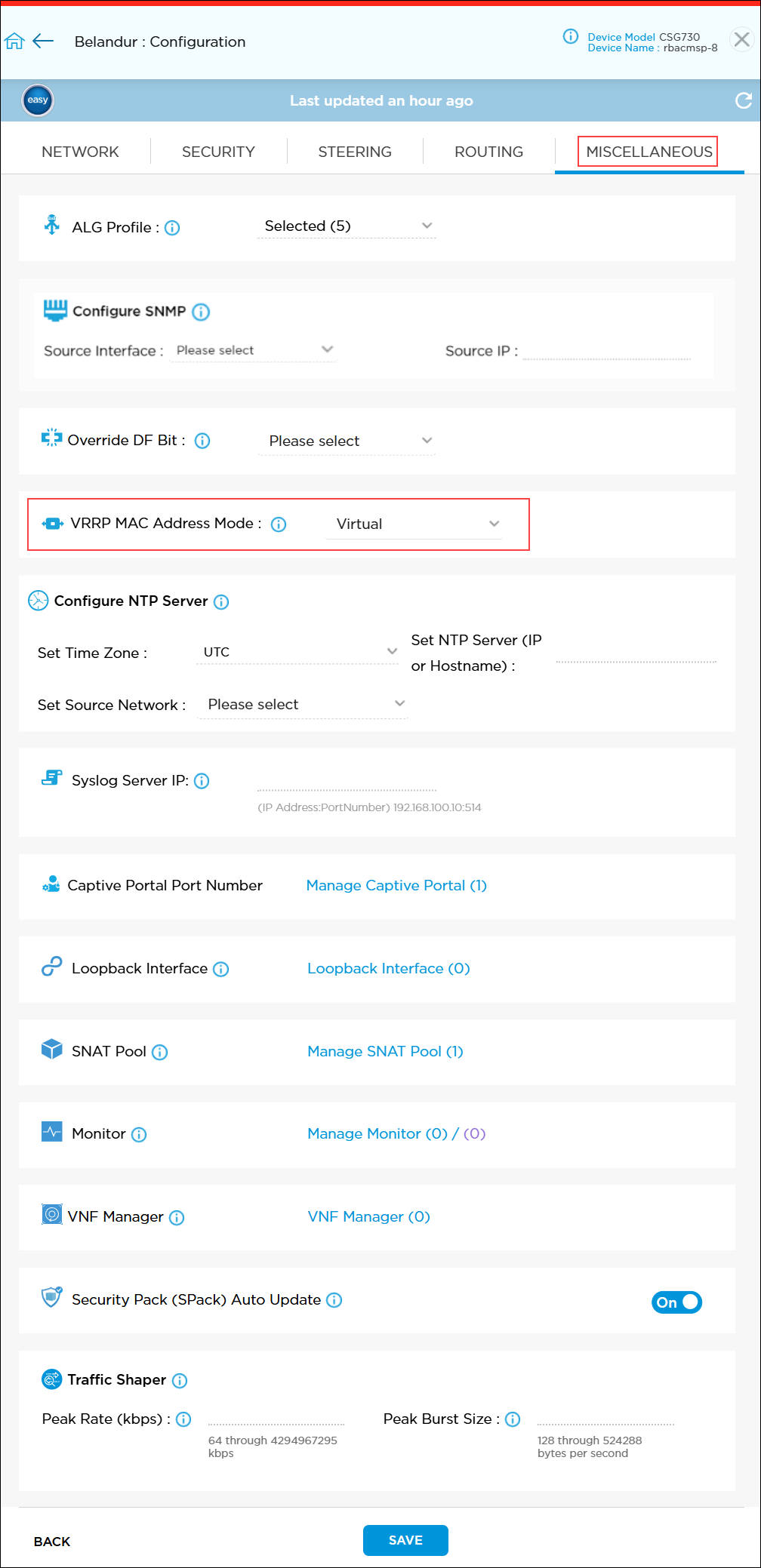
- VRRP MAC address mode—You can configure the VRRP MAC Address Mode option to customize failover behavior to suit your network. The VRRP MAC address mode allows you to choose faster switchover with virtual MAC mode or stricter compliance with physical MAC mode. See Configure Miscellaneous Parameters.
Limitations and Behavior Changes
Limitations and Behavior Changes in Release 11.0
The following are the limitations and behavior changes in Release 11.0:
- Uplink and downlink bandwidth options for LAN/VLAN are applicable only when you select Multiple IP Addresses option. If you select single IP Address option, uplink and downlink bandwidth options are not displayed.
- Whenever you reorder the DTLS, IPsec, and TLS tunnels, you must reregister the SASE Client.
- You cannot add custom VRFs to a provider organization in a multitenant device.
Revision History
Revision 1—Release 11.0, July 16, 2025
Revision 2—Release 11.2, January 14, 2026