
Configure Detection of Trusted Networks for SASE Gateways
 For supported software information, click here.
This article describes use cases and configuration for trusted network capabilities provided by Versa Networks.
Overview
When an enterprise uses Versa Secure Internet Access (VSIA), the Versa SASE client installed on end-user devices provides secure connectivity for for users who work remotely when they access internet resources. The connection to Versa cloud gateways is secured with client-based IPsec or SSL VPN.
However, there are use cases for enterprises that use VSIA for on-premise users where the additional IPsec or SSL VPN security is not beneficial. The additional security can limit the traffic visibility at the branch for policy enforcement and reporting, and can cause difficulties with internet access.
The branch or data center CPE-hosted IPsec tunnels provide on-premise user connectivity to Versa cloud gateways. The IPsec tunnels can be part of the SD-WAN overlay in a Versa single-vendor SASE solution or site-to-site tunnels in a Versa SSE solution.

Trusted Network Hostname
You can configure the trusted network hostname (TNH) to allow the SASE client to bypass connecting to the SASE gateway if the client is already behind a trusted VPN network. In Concerto, you configure the TNH, or the IP address of the trusted accessible network, when you configure secure client access policy rules.
When the Versa SASE client attempts to connect to a Versa cloud gateway, communication (ICMP) is tested to the trusted network host.
- If communication is successful, the network is considered to be trusted, and IPsec or SSL VPN is bypassed for Versa cloud gateway VSIA communication.
- If the communication is not successful, the network is considered to be untrusted, and IPsec or SSL VPN is used for Versa cloud gateway VSIA communication.
Semi-Trusted Mode
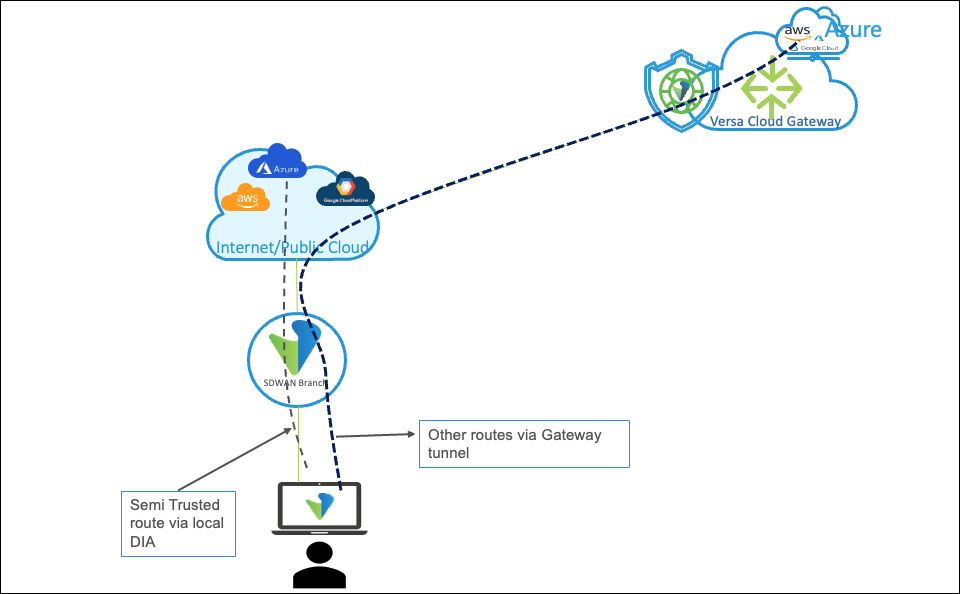
You can configure trusted subnets that bypass the tunnel. In semitrusted mode, the SASE client establishes a tunnel to the SASE gateway even when a trusted host is reachable without the tunnel. You can use semitrusted mode in deployments in which the site or branch CPE does not have a secure tunnel connection to the SASE gateway. The client establishes a tunnel to the gateway for all traffic except for traffic to trusted subnets.
When you configure trusted routes by adding one or more route prefixes and the TNH client detects the user is in a trusted network, those routes are offloaded locally and the client operates in semi-trusted mode. If no trusted routes are defined, the client disables the tunnel for all prefixes and enters in full bypass mode.
TNH Use Cases
This section describes the TNH use cases for Versa SASE client and cloud gateways.
Legacy Security Infrastructure Use Case
Enterprises that do not use Versa single-vendor SASE solution, or site-to-site tunnels for all branch locations (transition period) in a Versa SSE solution, to protect on-premise VSIA internet access might leverage a legacy, non-Versa SSE security infrastructure to protect internet traffic. In this scenario, the enterprise trusts the network and network path to the legacy, non-Versa security infrastructure.

To ensure that IPsec or SSL VPN connectivity is not used for traffic from the Versa SASE client, the enterprise configures the TNH, or IP address of the trusted accessible network, in the secure client access policy rules. The Versa SASE client tests ICMP connectivity to the trusted host and bypasses the IPsec or SSL VPN for internet bound traffic. The legacy, non-Versa security infrastructure provides internet protection.
Versa SSE Infrastructure Use Case
Enterprises that use Versa single-vendor SASE or SSE to protect on-premise VSIA internet access through SD-WAN overly or IPsec site-to-site tunnels (hosted on Versa SD-WAN or other vendor platform) from branch locations to Versa cloud gateways can configure the TNH to bypass Versa SASE client-based IPsec or SSL VPN. Traffic between the branch location and the Versa cloud gateway is already protected by the existing IPsec tunnel, which avoids difficulties in accessing the internet.
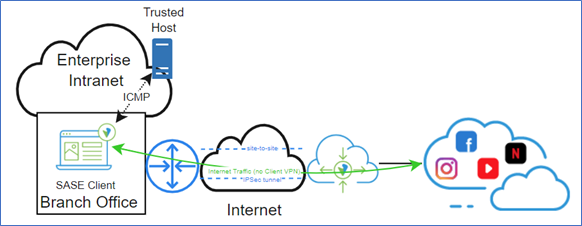
The Versa SASE client tests ICMP connectivity to the trusted host and bypasses the IPsec or SSL VPN for internet-bound traffic. The Versa SSE solution provides internet protection.
TNH is SASE client-based, and users are not authenticated by username on the Versa cloud gateway without additional configuration, such as user and device authentication rules. They will appear as unknown users (internet protection rules, etc.). In this case, the recommended trusted network approach when using IPsec tunnels to Versa cloud gateways is gateway-assisted trusted network detection (TND).
Configure TNH
To configure a TNH:
- Go to Configure > Security Service Edge > Secure Access > Client-based Access > Policy Rules.
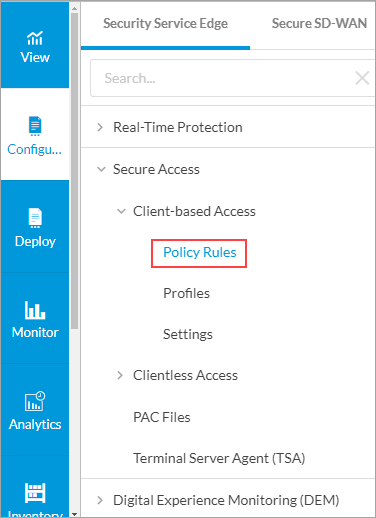
- In the Secure Client Access Policy Rule List screen, select a rule name. To create a secure client access rule, see Configure SASE Secure Client-Based Access Rules.

- In the Edit Secure Client Access Rule screen, click step 7 to go to Client Configuration, and then click Customize in the Client Controls pane to change the secure client gateway settings.

- In the Configure Client Controls screen, enter information for the following fields.

Field Description Trusted Network Hostname Enter the name of the trusted accessible network hostname or IP address. The TNH that you enter must be reachable through ICMP to ensure that tunnel bypass occurs. Trusted Routes Click the Trusted Routes down arrow to add routes that are trusted, and then enter one or more route prefixes. When you enable the TNH client configuration and it identifies that the user is in a trusted network, the trusted routes are locally offloaded from the SASE client tunnel and the client operates in semi-trusted mode. If the trusted routes are not populated, the client disables the tunnel for all prefixes in the trusted network and enters in full bypass mode.
- Click Next. To save and deploy the secure client-based access rule, see Review and Configure SASE Secure Client-Based Access Rules.
- When enterprises leverage Versa SSE internet protection and need to configure internet protection rules based on specific users, additional user authentication is required. To configure user authentication, see Configure User and Device Authentication.
Verify TNH
When you use the Versa SASE client to connect to a TNH-based trusted network, the SASE client display indicates that it has identified a trusted network and bypassed the tunnel.
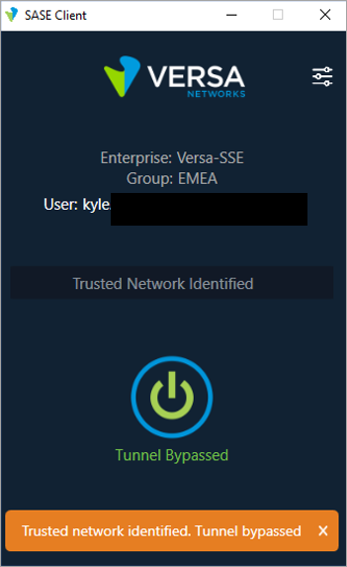
You can download the SASE client log file to verify TNH.
To download the SASE client log file:
- Click the Settings icon in the top-right corner of the SASE Client application, and then click Log Settings > Export Logs.

- After downloading logs, extract the logs and open the versa_secure_access_client log file.

The log file displays that TNH is in use and the tunnel is bypassed.

Trusted Network Detection
When you connect a device to a trusted network and connect an edge device to a SASE gateway using an IPsec tunnel or a SD-WAN tunnel, you do not need to establish an IPsec tunnel connection to the SASE gateway for a SASE client. Trusted network detection (TND) allows a device or application to automatically determine whether it is connected to a trusted network.
You can enable TND on a per enterprise or per VPN basis to perform gateway-assisted detection of trusted networks. You must configure TND after you configure secure client access profile rules.
TND Use Case
Enterprises that use Versa single-vendor SASE or SSE to protect on-premise VSIA internet access through SD-WAN overly or IPsec site-to-site tunnels (hosted on SD-WAN or other vendor platform) from branch locations to Versa cloud gateways can configure TND.

DNS requests for Versa cloud gateway FQDNs must be sent to the Versa cloud gateway. The Versa cloud gateway is configured with a DNS proxy for Versa cloud gateway FQDNs and returns a private IP address assigned from the cloud gateway client address pool in the DNS response. Versa SASE client then bypasses IPsec or SSL VPN for Versa cloud gateway VSIA communication.
TND is SASE gateway-based, and users are authenticated and displayed by username (internet protection rules, etc.). Versa cloud gateway performs the posture checks without additional Versa solution configuration. In this case, gateway-assisted TND is the recommended trusted network approach when using site-to-site tunnels to Versa cloud gateways.
Enable TND
Before you enable TND for external LDAP, SAML, or RADIUS user authentication profiles, you must create real-time protection internet protection rules. For example, when you leverage Azure Active Directory for SAML authentication, the relevant Microsoft applications, such as Microsoft and Windows Marketplace, and application groups, such as Office365-Apps, should be allowed for all users from the TND source zone (on premise site-to-site tunnels to SASE gateway tunnels) to the internet destination zone.
To enable TND:
- Go to Configure > Settings > VPN Settings.

- In the VPN Settings screen, select the name of the enterprise or VPN.
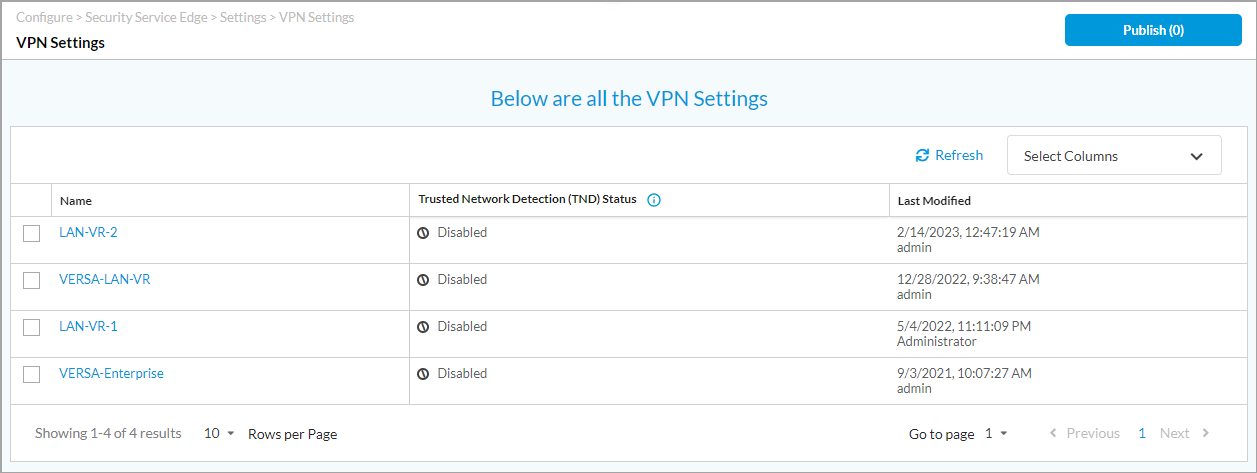
- Click the
 slider to enable or disable trusted network detection, and then click Save.

- Click Publish.
- In the Publish Status screen, select the gateway, and then click Publish.
Verify TND
When users are connected to a TND-based trusted network using the Versa SASE client, the SASE client displays that a trusted network is identified and the tunnel is bypassed.
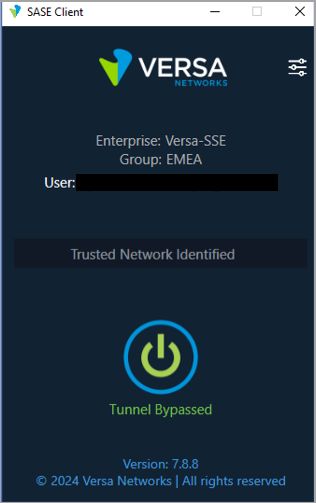
Secure access logs provide information on users connected through TND.
To view the secure access logs from Concerto, select Analytics > Dashboard > View > Secure Access > Users. For more information, see Secure Access Dashboards.
The following screenshot shows the time, user, device, RAC type (trusted network), IP information, and secure client access rule for the connected user.

If you have access to the Versa SASE gateway, you can verify IP mappings to the user for the TND connected users.

You can download the SASE client log file to verify TND.
To download the SASE client log file, click the Settings icon in the top-right corner of the SASE Client application, and then click Log Settings > Export Logs.

After downloading logs, extract the logs and open the versa_secure_access_client log file.

The log file displays that TND is used and the tunnel is bypassed.

TNH and TND Hybrid Use Case
Enterprises that did not deploy Versa single-vendor SASE SD-WAN overlay solution or Versa SSE VSIA site-to-site tunnels for all branch locations in a Versa SSE solution to protect on-premise VSIA internet access might leverage a legacy, non-Versa SSE security infrastructure to protect internet traffic while transitioning to Versa SASE or Versa SSE. In this scenario, utilizing Versa TNH and TND in a hybrid use case allows Versa SASE client tunnels to bypass the legacy and Versa SSE internet access.

In the above diagram, Branch Office A leverages the legacy internet protection infrastructure. To ensure that IPsec or SSL VPN connectivity is not used for traffic from the Versa SASE Client, the enterprise configures TNH using a trusted hostname or IP address in the secure client access policy rules configuration. The Versa SASE client checks ICMP connectivity to the trusted host and bypasses the IPsec or SSL VPN for internet bound traffic. The legacy, non-Versa security infrastructure provides internet protection.
Branch Office B uses Versa single-vendor SASE or SSE to protect on-premise VSIA internet access through SD-WAN overlay or IPsec site-to-site tunnels (hosted on SD-WAN or other vendor platform) to Versa cloud gateways. Gateway-assisted TND is configured in the Concerto VPN Settings on a per enterprise or VPN basis. DNS requests for Versa cloud gateway FQDNs must be sent to the Versa cloud gateway. The Versa cloud gateway is configured with a DNS proxy for Versa cloud gateway FQDNs and returns a private IP address assigned from the cloud gateway client address pool in the DNS response. Versa SASE client then bypasses IPsec or SSL VPN for Versa cloud gateway VSIA communication.
When you configure the TNH and TND hybrid use case, by default, TNH takes precedence over TND because TNH is Versa SASE client-based and occurs prior to TND, which is Versa SASE gateway-assisted. To ensure that TND takes precedence for locations using Versa SSE to protect on-premise VSIA internet access through IPsec site-to-site tunnels, the TNH-configured host should not have ICMP reachability from the TND branch office.
Software Information
Releases 12.1.1 and later support all content described in this article.