
Use the Versa Hash Utility
You can use the Versa hash utility tool to encrypt sensitive information in CSV or Excel files so that you can share these files without exposing the sensitive information. One use of the transformed files is as input for data loss prevention (DLP) policies, which perform an exact data match to detect policy violations, without exposing the sensitive information. For more information, see Configure Data Loss Prevention in Concerto and Configure Offline Data Loss Prevention.
The Versa hash utility tool uses the SHA256 hashing algorithm to transform, or convert, the contents of selected columns in CSV or Excel files, replacing sensitive values with a one-way hash and then saving the transformed contents in a file. The Versa hash utility tool considers the first row of the CSV or Excel file to be the header and does not hash the contents of this row.
You can use the Versa hash utility tool on devices running Windows 10 and higher or MacOSX 12 or higher.
To use the Versa Hash Utility:
Note: Once you use the Hash utility to hash the file, do not hash the file again in the DLP profile.
- Go to https://versanetworks.app.box.com/s/...95kgf37a2nkxm5 to download the hash utility to your system.

- Click the appropriate version for your system, MacOSX or Windows, then click the
 Download icon to download the hash utility. The utility downloads to your system.
 - Install the hash utility on your system.
- Click the
 VersaHashingUtility icon to open the hash utility. The following screen displays.

- Click the Browse button, then select an Excel or CSV file that you want to transform with the hash utility.

- Click the Transform button. The following screen displays the file name, the columns in the file, and the hash checkbox option for each column.

- Select the file name, the columns names, and click the Hash checkbox to hash the selected columns in the file.
- Click the Generate Output File button. The following screen displays.
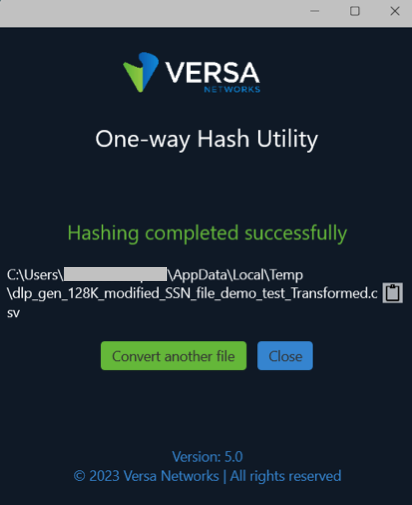
- You can click Convert Another File, or click Close to exit the hash utility.
The hashed file is now ready to be uploaded using Versa Concerto or Versa Director.
Additional Information
Configure Data Loss Prevention in Concerto
Configure Offline Data Loss Prevention
Manage Files and Folders (Concerto)
Manage Files and Folders (Director)