
Configure Unnumbered Interfaces
 For supported software information, click here.
An unnumbered interface is an IPv4 router interface that does not have its own IP address. Instead, Versa Operating SystemTM (VOSTM) provides the IP address of another interface to the unnumbered interface. This other interface is referred to as the donor interface, and is usually a loopback or tunnel virtual interface (TVI). Because they do not require a unique IP address, unnumbered interfaces help to conserve IP address space and simplify network configuration.
The following illustration shows a network with and without unnumbered interfaces. The interfaces without unnumbered interfaces each have their own IP addresses. The Ethernet (enet) interfaces with unnumbered interfaces use the IP address of the donor interface (here, tvi-0/0.0).

You can configure unnumbered interfaces on the following interface types:
- Virtual network interface (VNI)
- Aggregated Ethernet (AE) interface
- Ethernet interface
- Integrated routing and bridging (IRB) interface
- Dynamic port
Note the following when you configure unnumbered interfaces:
- Unnumbered interfaces should be used only on point-to-point links, primarily to bring up the underlay network.
- Both the unnumbered and donor interfaces should be in the same VRF.
- The donor interface should be a default TVI interface type.
To configure unnumbered interfaces:
- In Director view:
- Select the Administration tab in the top menu bar.
- Select Appliance in the left menu bar.
- Select a VOS device in the main pane. The view changes to Appliance view.
- Select the Configuration tab in the top menu bar.
- Select Networking > Interfaces in the left menu bar.

- Click the
 Add icon. The Add Interface window displays for the interface type selected, (here, ENet).
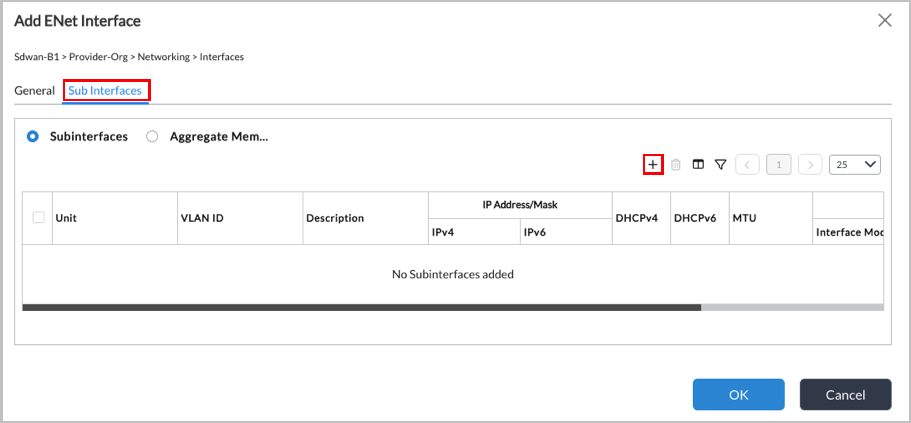
- Select the Sub Interfaces tab, and then click the Add icon. The Add Subinterface window displays.

- Select the IPv4 tab, and then click the Enable IPv4 toggle to enable IPv4.
- Click the Unnumbered checkbox.
- Click the Donor Interface field and select the donor interface from the drop-down list.
- Click OK.
Supported Software Information
Releases 23.1.2 and later support all content described in this article.