
CSG5000 Hardware Guide
At a Glance
The Versa Cloud Services Gateway (CSG) 5000 series appliances deliver carrier-grade reliability, high performance, and high computational capacity for enterprise-grade routing, SD-WAN, and next-generation security scenarios. They are designed for WAN edge deployments in large regional offices, campus sites, or data centers that require advanced secure SD-WAN along with comprehensive advanced application and cloud-intelligent SD-WAN and SASE services on-premises.
The CSG5000 series appliances enable secure, scalable, and reliable enterprise-wide networking.
CSG5000 series appliances run Versa Operating System™ (VOS™) software, which provides comprehensive integrated security, routing, SD-WAN, multitenancy, NGFW, UTM, and analytics in a single operating system.
Versa Networks management and control software, including Versa Director and Versa Analytics, support CSG5000 series appliances. Versa Director supports configuration, monitoring, and provisioning of CSG5000 series appliances, and Versa Analytics provides device, network, and security analytics. Managed service providers (MSPs) and enterprises of all sizes can deploy CSG5000 series appliances for scalable managed services.
The CSG5000 series appliances come with LAN and WAN ports, including four QSFP28-based 100-Gigabit Ethernet ports and sixteen SFP+/SFP28-based 10-Gigabit/25-Gigabit Ethernet ports. You can configure any of these ports as LAN or WAN ports even though CSG5000 interfaces are marked with LAN, WAN, and port numbers.
For Releases 22.1 and later, CSG5000 series appliances support hardware-based egress class of service (CoS) and shaping for Intel-based adapters, which support data rates up to 100 Gbps interfaces. You can configure four traffic classes at the interface level. The four interface-level traffic classes are scheduled as priority queues. There is only a single queue per traffic class. You can configure each traffic class for committed and maximum bandwidths as a percentage of line rate (that is, the interface transmit, or Tx, rate) or as an absolute rate, in kilobits per second. The traffic classes are scheduled as work conserving; that is, a traffic class can burst to its peak rate to consume any unused bandwidth from other traffic classes that are operating below their committed rate. Note that for hardware-based QoS, only interface-level shaping is supported. No other egress CoS and shaping configurations, including VLAN and adaptive shaping, are supported. For more information, see Configure CoS.
CSG5000 series appliances provide the following features:
- CSG5000 and CSG5200 models:
- 16 25/10-Gigabit Ethernet SFP+/SFP28 ports for LAN/WAN interfaces
- Four 100-Gigabit Ethernet QSFP28 ports for LAN/WAN interfaces
- CSG5250 model:
- Eight 25/10-Gigabit Ethernet SFP+/SFP28 ports for LAN/WAN interfaces
- Six 100-Gigabit Ethernet QSFP28 ports for LAN/WAN interfaces
- Management Ethernet ports
- One RJ45 Gigabit Ethernet port
- One RJ45 RS232 serial console port
- One intelligent platform management interface (IPMI) Gigabit Ethernet port for out-of-band management
- Two USB 3.0 management ports
- Field replaceable 1+1 redundant, hot-swappable power supply units (PSUs) (front-to-rear airflow)
- System cooling
- Three field replaceable 2+1 redundancy fans (front-to-rear airflow) for CSG5000 model appliances.
- Four field replaceable fans (front-to-rear airflow) for CSG5200 and CSG5250 model appliances.
- Rack-mountable in a 19-inch rack
CSG5000 Appliance Models
The CSG5000 series appliances are available in the following models:
- CSG5000
- CSG5200
- CSG5250
Chassis Views
CSG5000 Model Appliance
The CSG5000 series appliances front panel is the side of the appliance with LEDs for status and power, a soft reset button, and ports. It also has integrated rack-mount ears for installation in standard 19-inch racks. The rear panel has two hot-swappable power supply units, ground contact, and three cooling fans.
Figure 1 and Figure 2 show the front and rear panels of a CSG5000 model appliance.
Figure 1: Front Panel of a CSG5000 Model Appliance

Figure 2: Rear Panel of a CSG5000 Model Appliance

CSG5200 and CSG5250 Model Appliances
The CSG5200 and CSG5250 model appliances front panel is the side of the appliance with LEDs for status and power, a soft reset button, and ports. It also has integrated rack-mount ears for installation in standard 19-inch racks. The rear panel has two hot-swappable power supply units, ground contact, and four cooling fans. The rear panel of the CSG5200 and CSG5250 models are physically identical.
Figure 3 shows the front panel of a CSG5200 model appliance.
Figure 3: Front Panel of a CSG5200 Model Appliance

Figure 4 shows the front panel of a CSG5250 model appliance.
Figure 4: Front Panel of a CSG5250 Model Appliance

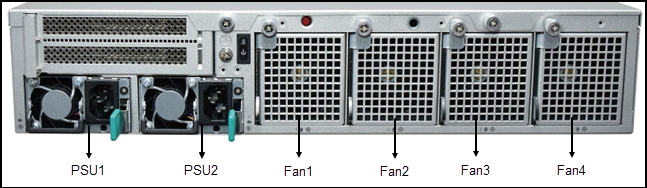
Figure 5 shows the rear panel of CSG5200 and CSG5250 model appliances.
Figure 5: Rear Panel of CSG5200 and CSG5250 Models Appliance

Front and Rear Panel Components
This article describes the front and rear panel components of a Cloud Services Gateway (CSG) 5000 series appliance. For the exact location of these components on the appliance, see At a Glance.
Front Panel
The front panel of a CSG5000 series appliance has the following components:
- CSG5000 model appliance
- One power button
- One reset button
- Four status LEDs
- CSG5200 and CSG5250 model appliances
- One reset button
- Three status LEDs
LEDs
Status LEDs provide the operational status of the appliance and interfaces.
Table 1 lists the LEDs, their colors and states, and the status they indicate for a CSG5000 model appliance.
Table 1: Front Panel LEDs in a CSG5000 Model Appliance
| LED | Color | Status |
|---|---|---|
| Power | Green |
|
| Status | Green, Red |
|
| Cloud | Green, Red |
Currently not supported. |
Table 2 lists the LEDs, their colors and states, and the status they indicate for CSG5200 and CSG5250 model appliances.
Table 2: Front Panel LEDs in CSG5200 and CSG5250 Model Appliances
| LED | Color | Status |
|---|---|---|
| Power | Green |
|
| Status | Green, Red |
|
| Storage |
Currently labeled as cloud LED and cannot be controlled by software.
|
Power Button
Pressing the power on/standby button on the front panel of a CSG5000 series appliance turns the power on.
To turn the power off, use one of the following methods:
- Press and release the power on/standby button. This method initiates a controlled shutdown of applications and the operating system before the appliance enters standby mode.
- Press and hold the power on/standby button for 4 seconds or more. If an application stops responding, you can use this method to force a shutdown.
Reset Button
The Reset button on the front panel of a CSG5000 appliance resets the appliance to the factory-default settings. The reset functionality depends on the number of times you press the button within a span of 30 seconds, as described in Table 3. In between each press of the reset button, you must pause for a second to register the key press.
The Reset button is recessed so that it is not accidentally pressed while the appliance is operational.
To press the Reset button, use a narrow tool.
Table 3: Reset Button Press Behavior
| Number of Presses | Behavior |
|---|---|
| 2 | Reset the appliance to the factory-default snapshot. |
| 4 | Reset the appliance to the branch prestaging configuration. |
| 6 | Reset the appliance to the branch staging configuration. |
| 8 | Reset the appliance to branch post-staging configuration. |
Reset the Appliance from the CLI
You can reset the appliance to the factory-default configuration by issuing the request system reset CLI command. To do this, your first connect to the appliance through the serial console port or by using SSH.
The factory-default reset procedure can take up to 20 minutes to complete. Do not power off the appliance during this time.
To reset an appliance to the factory-default configuration:
- Connect to the appliance using one of the following methods:
- To connect to the appliance through the serial console port, see Configure a Management Console to Connect to a CSG5000 Appliance.
- To connect to the appliance using SSH:
- Connect your PC to the management port of the appliance. The management port has the default static IP address 10.10.10.10/24.
- Configure the PC IP address to any IP from this segment, for example, 10.10.10.1/24.
- Open an SSH session to the appliance using its IP address, 10.10.10.10.
- Log in to the appliance. Please consult Versa Networks technical support for default credentials.
- Start the CLI:
$ cli
- Enter the configure command to switch to configuration mode. The prompt changes to %.
- Issue the following command to reset the configuration to the factory default. If the current software version on the appliance is the same as that of the factory reset snapshot, the procedure takes about 10 minutes to complete. If the software versions are different, the procedure takes about 20 minutes to complete. Do not power off the appliance during the process.
% request system reset
- Verify that all Versa services are running by issuing the vsh status command from the Linux bash CLI. The following is a sample output of this command. If all the services are shown as stopped, issue the vsh start command from the Linux bash CLI to start them manually.
# vsh status
versa-service    is Running, [*] process 6784
versa-infmgr     is Running, [-] process 5623
versa-rfd        is Running, [-] process 5838
versa-vmod       is Running, [-] process 5839
versa-ip2user    is Running, [-] process 5844
versa-imgr       is Running, [-] process 5848
versa-acctmgrd   is Running, [-] process 5845
versa-fltrmgr    is Running, [-] process 5648
versa-vstated    is Running, [-] process 5625
versa-addrmgrd   is Running, [-] process 5857
versa-rt-cli-xfm is Running, [-] process 5798
versa-rtd        is Running, [-] process 5827
versa-dhcpd      is Running, [-] process 5620
versa-eventd     is Running, [-] process 5843
versa-vrrpd      is Running, [-] process 5643
versa-dnsd       is Running, [-] process 5646
versa-ppmd       is Running, [-] process 5793
versa-snmp-xform is Running, [-] process 5800
versa-certd      is Running, [-] process 5849
versa-ntpd       is Running, [*] process 5612
versa-dhclient6  is Running, [-] process 5807
versa-redis      is Running, [-] process 6927
versa-av-redis   is Running, [-] process 5003
versa-spackmgr   is Running, [-] process 5832
versa-monit      is Running, [*] process 6078
versa-confd      is Running, [*] process 4798
versa-fail2ban   is Running, [*] process 6093
versa-auditd     is Running, [*] process 6116
versa-nodejs     is Running, [-] process 5775
- Power off the appliance:
# sudo poweroff
Rear Panel
The rear panel of a CSG5000 series appliance has the following components.
CSG5000 Model Appliance
- Two hot-swappable power supply units (PSUs), each 850 W, that provide 1+1 redundancy with front-to-back airflow
- Three front-to-back cooling field-replaceable fans that provide 2+1 redundancy
Figure 1: Rear Panel of a CSG5000 Appliance

CSG5200 and CSG5250 Model Appliances
- Two hot-swappable power supply units (PSUs), each 1300 W, that provide 1+1 redundancy with front-to-back airflow
- Four front-to-back cooling field-replaceable fans
Figure 2: Rear Panel of CSG5200 and CSG5250 Model Appliances
Interface Numbering
This article describes the Ethernet ports to virtual network interface (VNI) numbering for Cloud Services Gateway (CSG) 5000 series appliances.
Figure 1 shows the mapping of Ethernet ports to VNI numbering for the CSG5000 model appliances.
Figure 1: CSG5000 Model Port-to-VNI Mapping

Figure 2 shows the mapping of Ethernet ports to VNI numbering for the CSG5200 model appliances.
Figure 2: CSG5200 Model Port-to-VNI Mapping
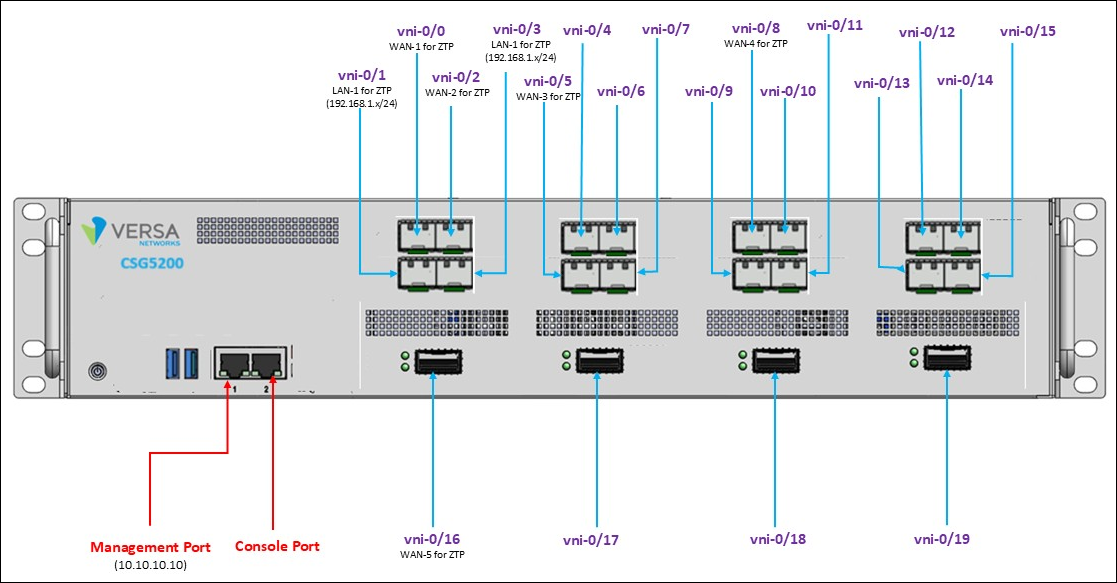
Figure 3 shows the mapping of Ethernet ports to VNI numbering for the CSG5250 model appliances.
Figure 3: CSG5250 Model Port-to-VNI Mapping

Install a CSG5000 Series Appliance
This article provides instructions about how to unpack a Cloud Services Gateway (CSG) 5000 series appliance and how to install it. You can mount a CSG5000 series appliance directly in a 19-inch rack, or you can install a slide rail in a 19-inch rack and then mount the CSG5000 series appliance on the slide rail. The minimum depth of the slide rail is 698 mm (27.48 inches), and the maximum depth is 998 mm (39.39 inches).
Unpack a CSG5000 Series Appliance
The CSG5000 series appliance is packed in a plastic bag, and it is shipped in a cardboard carton, secured with foam packing material. The carton also contains an accessory box. It is recommended that you unpack the appliance only when you are ready to install it.
To unpack a CSG5000 series appliance:
- Open the top flaps of the cardboard carton.
- Remove from the box the foam packing material holding the appliance and the accessories in place. See Figure 1.
- Remove the accessory box and the appliance from the foam packing material.
- Remove the accessories from the accessories box.
- Verify the components against the packing list that is included in the box.
Figure 1: Unpack a CSG5000 Appliance

Note: It is recommended that you save the shipping carton and packing material when unpacking the appliance, in case you need to later move the appliance or return it. See How To Return Hardware.
Packing List for a CSG5000 Series Appliance
The cardboard carton in which a CSG5000 series appliance is shipped contains a packing list. Check the packing list against the parts that you receive in the shipping carton.
Table 1 lists the parts shipped with a CSG5000 series appliance.
Table 1: Parts Shipped with a CSG5000 Series Appliance
| Components | Quantity |
|---|---|
| CSG5000 appliance chassis | 1 |
| Power cable (US only) | 2 |
| Console cable USB to RJ-45 | 1 |
| LAN cable | 1 |
| Grounding wire (#18 AWG) | 1 |
| Rear-post brackets | 2 |
| Rear-post bracket ears | 2 |
| Screws for ear locking | 2 |
| Screws for rack mounting | 4 |
| Screws | 20 |
Mount a CSG5000 Series Appliance in a Rack
You can mount a CSG5000 series appliance in a four-post, 19-inch rack.
To mount the appliance, ensure that you have the following tools:
- Number 2 Phillips (+) screwdriver
- Tape measure
To mount a CSG5000 series appliance in a four-post, 19-inch rack:
- Place the appliance chassis on a flat, stable surface.
- Check the internal dimensions of the rack with a tape measure. The appliance is 43.8 mm wide (about 17.24 inches) and must fit within the mounting posts.
- Attach the two rear post brackets to the appliance chassis using the six bracket screws that are shipped with the appliance. Use the rack screws to secure the switch in the rack.
- Lock the position of the rear post bracket ears using the included position-locking screws. You can adjust the rear post bracket ears to fit different rack depths, from 56 cm to 75 cm.
Warning:
- This equipment is to be installed for operation in an environment with a maximum ambient temperature below 40°C.
- The openings on the enclosure are for air convection to protect the equipment from overheating. DO NOT COVER THE OPENINGS.
- Carefully mount the equipment into the rack, in such manner, that it won’t be hazardous due to uneven mechanical loading.
- Place this equipment on a stable surface when installing. A drop or fall could cause injury.
- Make sure the voltage of the power source is within the specification on the label when connecting the equipment to the power outlet. The current load and output power of loads shall be within the specification.
- This equipment must be connected to reliable grounding before using. Pay special attention to power supplied other than direct connections, e.g. using power strips.
Mount a CSG5000 Series Appliance on a Slide Rail
You can install a slide rail in a 19-inch rack and then install a CSG5000 series appliance on the slide rail. You can purchase an optional slide rail kit when you purchase a CSG5000 series appliance.
Warning:
- Stability hazard—The rack may tip over causing serious personal injury.
- Before extending the rack to the installation position, read the installation instructions.
- Do not put any load on the slide-rail mounted equipment in the installation position.
- Do not leave the slide-rail mounted equipment in the installation position.
Attention:
- Danger d’instabilité—Le rack peut basculer et provoquer des blessures corporelles graves.
- Avant d’étendre le rack en position d’installation, lire les instructions d’installation.
- Ne pas charger l’équipement monté sur rail de glissière en position d’installation.
- Ne pas laisser l’équipement monté sur rail de glissière en position d’installation
To install a slide rail in a 19-inch rack and install a CSG5000 series appliance on the slide rail:
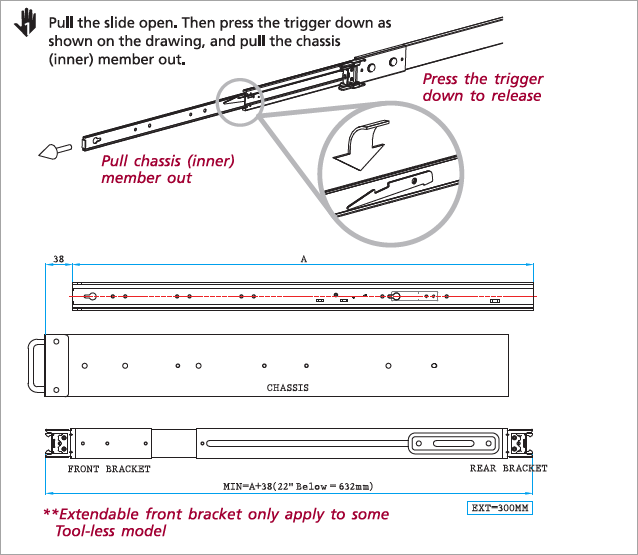
- Push the lever down, and then pull the inner rail all the way out of the middle rail.
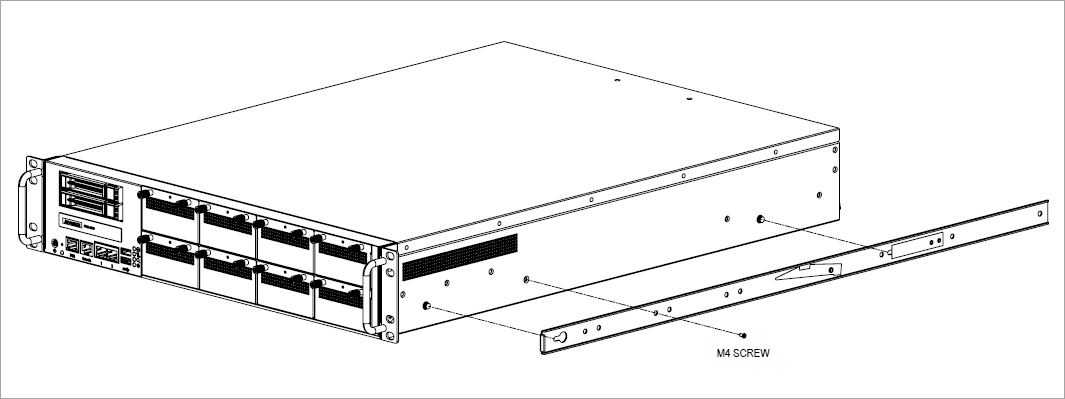
- Use the M4 screws from accessory box to mount the inner rail to chassis.
- Attach the cabinet (outer) member to the rail.

- Mount the chassis into the cabinet. Align and push the inner rails into the extended middle rails. After the chassis is mounted in the middle rails, hold down the locking lever to push the chassis all the way into the rack.

Connect a CSG5000 Series Appliance
This article describes how to connect a Cloud Services Gateway (CSG) 5000 series appliance to an AC power source and to a management console.
Versa Networks recommends that you use an uninterruptible power strategy that prevents power interruptions. A UPS can isolate unpredictable power outages or blackouts, brownouts, lightning, power surges, or spikes.
Warning: A prominent instruction is provided at each disconnect device giving adequate instructions for the removal of all power from the unit.
 (60417-6042) and
  (60417-6172)
Caution: Shock hazard. Disconnect all power sources.
Attention: Danger de choc Déconnecter toutes les sources d’énergie" ou texte equivalent
Step 1: Connect Earth Ground to a CSG5000 Series Appliance
Warning: Before turning on the device, ground the grounding cable of the equipment. Proper grounding (grounding) is very important to protect the equipment against the harmful effects of external noise and to reduce the risk of electrocution in the event of a lightning strike. To uninstall the equipment, disconnect the ground wire after turning off the power. A ground wire is required and the part connecting the conductor must be greater than 0.75 mm2 or 18 AWG.
Attention: Avant d’allumer l’appareil, reliez le câble de mise à la terre de l’équipement à la terre.
Une bonne mise à la terre (connexion à la terre) est très importante pour protéger l’équipement contre les effets néfastes du bruit externe et réduire les risques d’électrocution en cas de foudre.
Pour désinstaller l’équipement, débranchez le câble de mise à la terre après avoir éteint l’appareil.
Un câble de mise à la terre est requis et la zone reliant les sections du conducteur doit faire plus de 0.75 mm2 or 18 AWG.
- To ensure proper operation of a CSG5000 series appliance and to meet safety and electrostatic discharge (ESD) requirements, you must connect the appliance to earth ground before you connect power to the appliance.
- Ensure that the rack is properly grounded and in compliance with ETSI ETS 300 253. Verify that there is a good electrical connection to the grounding point on the rack and that the grounding point has no paint or isolating surface treatment.
- For CSG5000 model appliance, attach the grounding wire (#18 AWG) to the grounding point on the device's rear panel. For CSG5200 and CSG5250 model appliances, attach the grounding wire (greater than 10 mm2 or #18 AWG) to the grounding point on the device's rear panel.
- Connect the other end of the wire to rack ground.
Warning: Class I Equipment. This equipment must be earthed. The power plug must be connected to a properly wired earth ground socket outlet. An improperly wired socket outlet could place hazardous voltage on accessible metal parts.
Product shall be used with Class 1 laser device modules.
Attention: Équipement de classe I. Ce matériel doit être relié à la terre. La fiche d’alimentation doit être raccordée à une prise de terre correctement câblée. Une prise de courant mal câblée pourrait induire des tensions dangereuses sur des parties métalliques accessibles.
Le produit doit être utilisé avec des modules d'appareils laser de classe 1
Caution: The earth connection must not be removed unless all supply connections are disconnected.
Step 2: Connect AC Power to a CSG5000 Series Appliance
Before you begin connecting AC power to a CSG5000 series appliance, ensure that you have:
- Electrostatic discharge (ESD) wrist strap.
- An AC power cord is shipped with the appliances only for U.S. customers. Each power supply has a C14 plug that allows you to plug in standard power cords with C13 termination. The other end of the cord must have appropriate NEMA 5-15 local plug.
To connect a CSG5000 series appliance to an AC power source:
- Install two AC power supply units (PSUs) in the device.
- Connect an external AC power source (C13) to each PSU.
- Plug the NEMA 5-15 end of the AC power cord into an AC power source outlet.
- Push the power button to power on the device.
Step 3: Check that the CSG5000 Series Appliance is Powered On
To check the CSG5000 series appliance is powered on, check that the Power LED is on. When the appliance is operating normally, the power LED is green.
Step 4: Configure a Management Console To Connect to a CSG5000 Series Appliance
CSG5000 series appliances are equipped with an RJ45 serial console port and an RJ45-to-USB serial console cable that you use to connect the console port. To communicate with the appliance, you must have a terminal emulation program, such as PuTTY, running on your system.
When you set up the connection, use the following default console port settings:
- Speed (baud): 115200
- Data bits: 8
- Stop bits: 1
- Parity: None
- Flow control: None
To connect a management console to a CSG5000 series appliance:
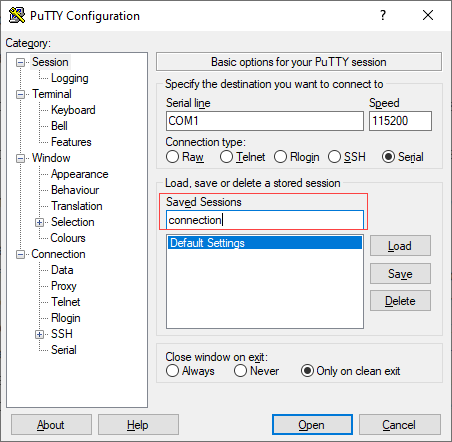
- Open the PuTTY application. The PuTTY configuration window displays.
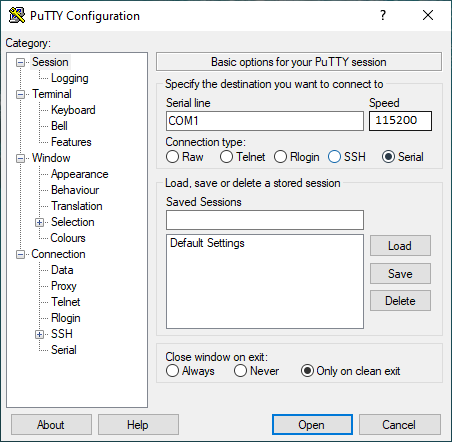
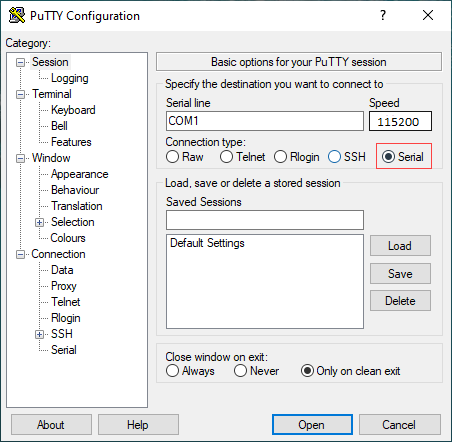
- In the Category navigation pane, click Session, and then in the Connection Type menu, click Serial.
- In the Category navigation pane, click Connection > Serial. The Options Controlling Local Serial Lines page displays.
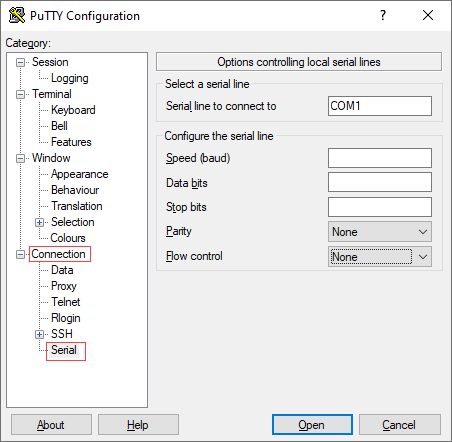
- In the Serial Line To Connect To field, enter the COM port to which your device is connected. The default COM port is COM1.

- In the Configure the Serial Line section, enter the following information.
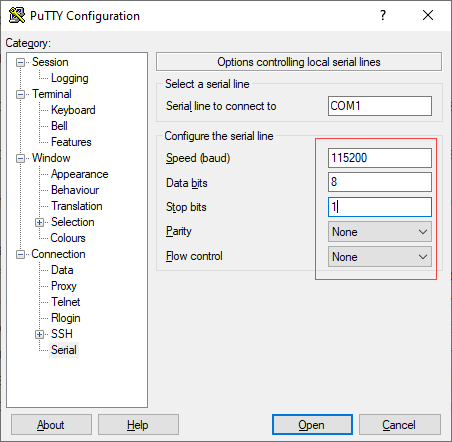
- In the Speed (Baud) field, enter the digital transmission speed. For CSG5000 series appliance, the speed must be 115200 baud.
- In the Data bits field, enter the number of data bits used for each character. The recommended value is 8.
- In the Stop bits field, enter the number of bits to send at the end of every character. The recommended value is 1.
- In the Parity field, select None. This is the method of detecting errors in transmission.
- In the Flow Control field, select None. This is the method of preventing data overflow.
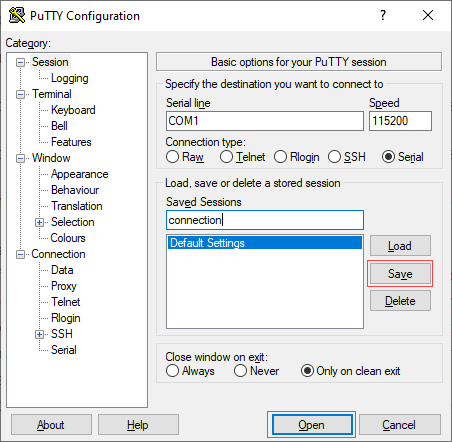
- Optionally, in the Category navigation pane, click Session, and then in the Saved Sessions field, enter a name to save the session settings.
- Click Save.
- To open the session, click Open.
- Log in to the appliance CLI with the username "admin" and the password "versa123".
